Eco - Global Survival Game System Requirements (2018) | Minimum & Recommended PC Specs
Quick Hardware Summary
Eco - Global Survival Game requires at least a capable CPU, a dedicated GPU, and 8 GB RAM. For recommended settings, aim for powerful CPU and high-end GPU.
Can I Run Eco - Global Survival Game?
Enter your PC specs to instantly check compatibility
About Eco - Global Survival Game
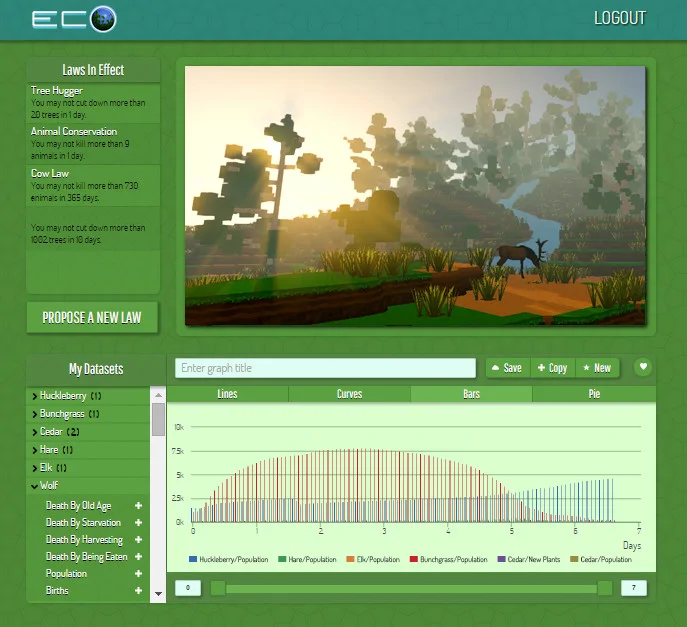
Enter the world of Eco, where you must team-up to build civilization and prevent a disaster, using resources from a fully simulated ecosystem, where your every action affects the lives of countless species.
Will you and your fellow builders collaborate successfully, creating laws to guide player actions, finding a balance that takes from the ecosystem without damaging it? Or will the world be destroyed by short-sighted choices that pollute the environment in exchange for immediate resource gains? Or, do players act too slowly, and the world is consumed by a disaster that could have been avoided if you developed the right technology? In Eco, you must find a balance as a group if the world is to survive.A world-survival game Eco is a survival game in a global sense, where it is not just the individual or group who is threatened, but the world itself. The world of Eco will be home to a population of thousands of simulated plants and animals of dozens of species, each living out their lives on a server running 24 hours a day, growing, feeding and reproducing, with their existence highly dependent on other species.
Enter humans into this equation, and things get complicated. It is the role of players to thrive in this environment by using resources from the world to eat, build, discover, learn and invent. However, every resource they take affects the environment it is taken from, and without careful planning and understanding of the ecosystem, lands can become deforested and polluted, habitats destroyed, and species left extinct.
In the extreme, the food supply of the ecosystem can be destroyed, along with all human life on it, resulting in server-wide perma-death. Eco is a game where the player’s actions have meaningful consequences.
Everything you do affects the ecosystem, and players can destroy their food supply and world (server-wide permadeath)
Create a player-run government to make decisions as a group, proposing and voting on laws
Use data gathered from the world to propose and vote on laws as a group. Debate with scientific argumentation.
Create a player-run economy that allows you to sell not only good but services in the form of server-enforced contracts (simulating a player driven quest system).
PvP takes the form of a player-run criminal justice system. Breaking the player-made laws can result in arrest and punishment.
Your food level determines your skill-increase rate, making food very important and tying players directly to the ecosystem from which it comes.
A game with goals higher than entertainment. We plan to build it for schools as an augmented classroom world students share.
Eco - Global Survival Game System Requirements
Minimum
- OS:
- -
- CPU:
- Not specified
- GPU:
- Not specified
- RAM:
- Not specified
- File Size:
- -
Recommended
- OS:
- -
- CPU:
- Not specified
- GPU:
- Not specified
- RAM:
- Not specified
Can I run Eco - Global Survival Game on my PC?
To run Eco - Global Survival Game on PC you need at minimum a Not specified processor, a Not specified graphics card, and Not specified of RAM running on Windows 10. For the best experience at recommended settings, upgrade to a Not specified CPU and Not specified GPU.
What GPU do I need to run Eco - Global Survival Game?
The minimum GPU required to run Eco - Global Survival Game is the Not specified. For smooth gameplay at high graphics settings, a Not specified is recommended.
How much RAM does Eco - Global Survival Game require?
Eco - Global Survival Game requires a minimum of Not specified RAM. For the recommended experience, Not specified of RAM is suggested.
How to check if your PC can run Eco - Global Survival Game
- Check your CPU: Compare your processor against the minimum requirement: Not specified.
- Check your GPU: Your graphics card should meet or exceed: Not specified.
- Check your RAM: You need at least Not specified of RAM installed.
- Check storage: Ensure you have at least Not specified of free disk space.
- Use our tool above: Select your RAM in the "Can I Run It?" box to get an instant result.