Spatial Ops Manager System Requirements (2025) | Minimum & Recommended PC Specs
Quick Hardware Summary
Spatial Ops Manager requires at least a Intel Dual Core with Hyper-Threading CPU, a Nvidia GeForce GTX 970 GPU, and 8 GB RAM. For recommended settings, aim for powerful CPU and high-end GPU.
Can I Run Spatial Ops Manager?
Enter your PC specs to instantly check compatibility
About Spatial Ops Manager
Step into the future of immersive multiplayer entertainment! Designed specifically for arcades, VR arenas, Family Entertainment Centers, and other entertainment venues, the Spatial Ops Manager App transforms the popular Spatial Ops experience into a scalable and operator-friendly attraction.
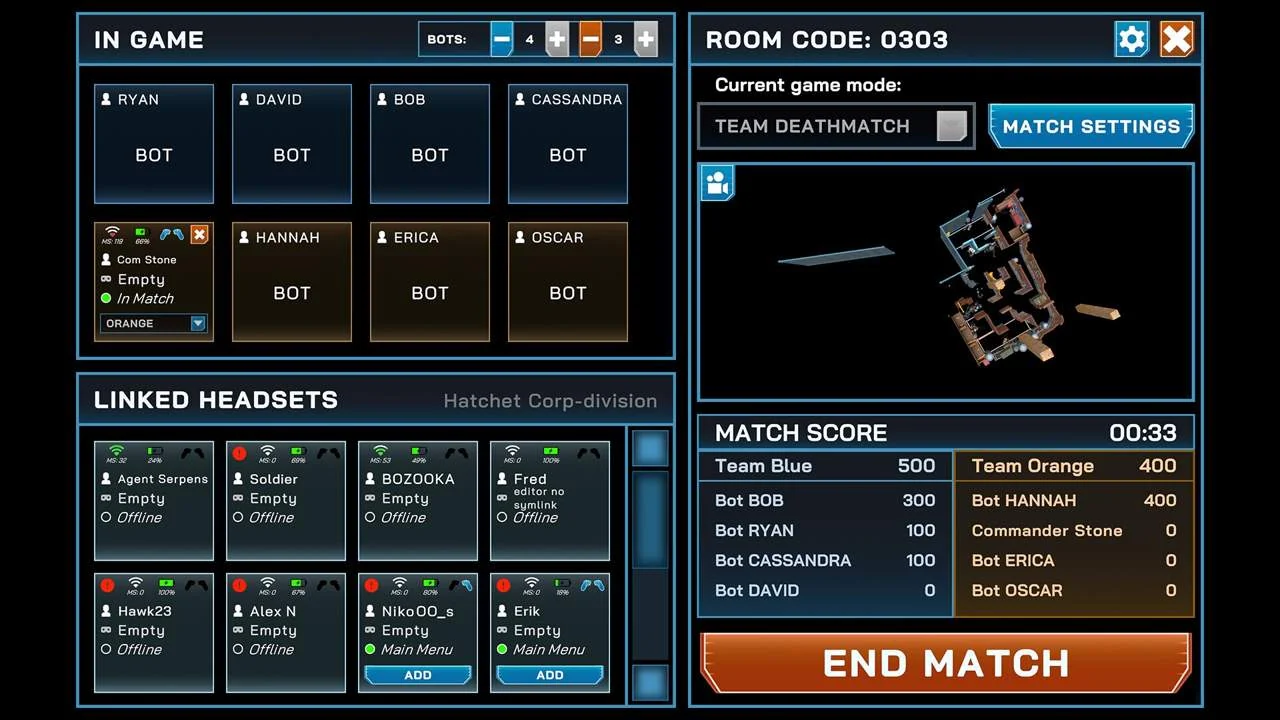
The Spatial Ops Manager App is a desktop application for PC and Mac that provides centralized control and coordination of the game experience for group play in Arena mode. With just a few clicks, operators can manage multiple Meta Quest headsets, launch sessions, and monitor gameplay—all from a single interface.
Key Features:
Centralized Management: Simplify operations with a desktop-based Manager app that lets you control and coordinate sessions without needing players to navigate headset menus.
Seamless Integration: Guests use the standard Spatial Ops game available on the Meta Quest Store—no custom builds or sideloading required. This ensures consistent performance and effortless updates.
Scalable for Operators: Whether you're running a small arcade or a large-scale entertainment venue, the Spatial Ops Manager App adapts to your needs, delivering high-octane multiplayer VR action with minimal setup hassle.
Note:
Spatial Ops Manager is currently in active development, with additional features and improvements on the way to expand its capabilities and streamline the operator experience. We’re actively gathering feedback from operators to refine the experience, enhance stability, and broaden platform support.
Spatial Ops Manager System Requirements
Minimum
- OS:
- Windows 10
- CPU:
- Intel Dual Core with Hyper-Threading
- GPU:
- Nvidia GeForce GTX 970
- RAM:
- 8 GB
- File Size:
- 5 GB
Recommended
- OS:
- -
- CPU:
- Not specified
- GPU:
- Not specified
- RAM:
- Not specified
Can I run Spatial Ops Manager on my PC?
To run Spatial Ops Manager on PC you need at minimum a Intel Dual Core with Hyper-Threading processor, a Nvidia GeForce GTX 970 graphics card, and 8 GB of RAM running on Windows 10. For the best experience at recommended settings, upgrade to a Not specified CPU and Not specified GPU.
What GPU do I need to run Spatial Ops Manager?
The minimum GPU required to run Spatial Ops Manager is the Nvidia GeForce GTX 970. For smooth gameplay at high graphics settings, a Not specified is recommended.
How much RAM does Spatial Ops Manager require?
Spatial Ops Manager requires a minimum of 8 GB RAM. For the recommended experience, Not specified of RAM is suggested.
How to check if your PC can run Spatial Ops Manager
- Check your CPU: Compare your processor against the minimum requirement: Intel Dual Core with Hyper-Threading.
- Check your GPU: Your graphics card should meet or exceed: Nvidia GeForce GTX 970.
- Check your RAM: You need at least 8 GB of RAM installed.
- Check storage: Ensure you have at least 5 GB of free disk space.
- Use our tool above: Select your RAM in the "Can I Run It?" box to get an instant result.