Tavern Master Demo System Requirements (2021) | Minimum & Recommended PC Specs
Quick Hardware Summary
Tavern Master Demo requires at least a Intel Core 2 Duo CPU, a dedicated GPU, and 3 GB RAM. For recommended settings, aim for powerful CPU and high-end GPU.
Can I Run Tavern Master Demo?
Enter your PC specs to instantly check compatibility
3 GB
N/A
About Tavern Master Demo
Full version of Tavern Master is available here
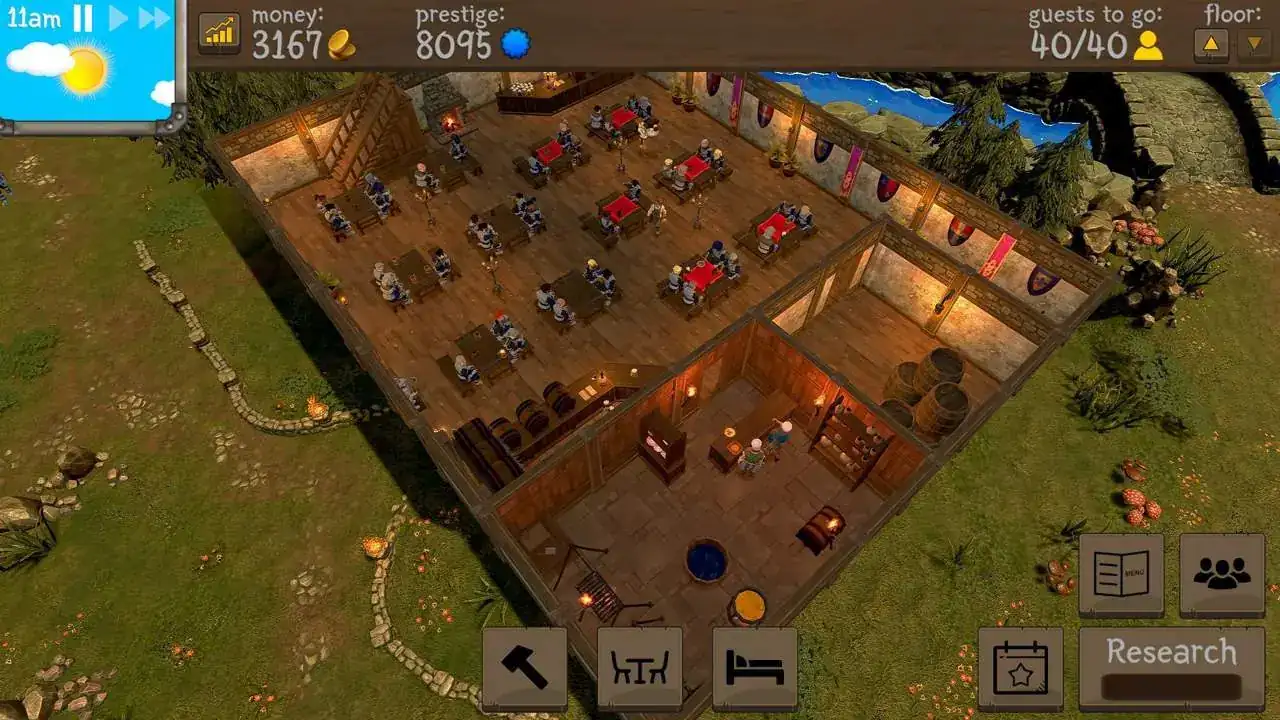
Design and build your own medieval tavern! Tavern Master is a medieval tavern management game where you are in charge of building, maintaining and running your very own cozy tavern!
Buy tables and benches, fill barrels with drinks, hire staff and you are ready to serve your first customers. Make sure your employees are happy, there are enough drinks and seats for guests and soon you will be able to expand your business in various ways.
Build your dream tavern
You will have many tools at your disposal that will help you create a perfect tavern. There are many different walls, floors, fences, stairs and furniture that will make every tavern unique. At the beginning there will not be enough gold to buy the best quality furniture but as your business grows so will the tavern! As a cherry on top, make sure to think of an amazing name for it!
Optimize the workflow
In order to attract customers you will need to have enough seats and tables with a light source close by. The surrounding area also needs to look beautiful and decorations will help with that. At one point there will be a lot of guests coming in and it is important that your staff can serve everyone before they leave angry from waiting too long. In order to do that you will have to design the space so there is an efficient way for your employees to walk in an optimized route.
Create rooms for overnight stay
Some of the guests will want to spend the night so it’s a great thing that you can create rooms with beds in your tavern! Every room will be rated with stars from 1 to 5 which will determine how much money you can earn from the guests. It’s your choice if you want to create big rooms with 5 beds or smaller rooms with expensive furniture that would make guests spend more money.
Many ways to play
There are many different possibilities in Tavern Master and there is no single best way to play. You can spend your time decorating the tavern and making it look cozy and beautiful, you can work towards maximizing revenue by adjusting seating arrangement, prices and salaries for the staff or figure out a completely new way like building only bedrooms instead of having the bar and the kitchen.
Design and build your own medieval tavern! Tavern Master is a medieval tavern management game where you are in charge of building, maintaining and running your very own cozy tavern!
Buy tables and benches, fill barrels with drinks, hire staff and you are ready to serve your first customers. Make sure your employees are happy, there are enough drinks and seats for guests and soon you will be able to expand your business in various ways.
- Build a kitchen and hire chefs to start serving food of all kinds. Make sure that there are enough ingredients or your customers might leave angry
- Hold special events to attract special customers who have very specific food and drink requirements. They will come in the morning and stay all day
- Hire musicians to attract more people to your tavern and make customers have more patience while waiting for a drink
Build your dream tavern
You will have many tools at your disposal that will help you create a perfect tavern. There are many different walls, floors, fences, stairs and furniture that will make every tavern unique. At the beginning there will not be enough gold to buy the best quality furniture but as your business grows so will the tavern! As a cherry on top, make sure to think of an amazing name for it!
Optimize the workflow
In order to attract customers you will need to have enough seats and tables with a light source close by. The surrounding area also needs to look beautiful and decorations will help with that. At one point there will be a lot of guests coming in and it is important that your staff can serve everyone before they leave angry from waiting too long. In order to do that you will have to design the space so there is an efficient way for your employees to walk in an optimized route.
Create rooms for overnight stay
Some of the guests will want to spend the night so it’s a great thing that you can create rooms with beds in your tavern! Every room will be rated with stars from 1 to 5 which will determine how much money you can earn from the guests. It’s your choice if you want to create big rooms with 5 beds or smaller rooms with expensive furniture that would make guests spend more money.
Many ways to play
There are many different possibilities in Tavern Master and there is no single best way to play. You can spend your time decorating the tavern and making it look cozy and beautiful, you can work towards maximizing revenue by adjusting seating arrangement, prices and salaries for the staff or figure out a completely new way like building only bedrooms instead of having the bar and the kitchen.
Score N/A
Released 11/15/2021
Developer
Publisher
Tavern Master Demo System Requirements
Minimum
- OS:
- Windows XP
- CPU:
- Intel Core 2 Duo
- GPU:
- Not specified
- RAM:
- 3 GB
- File Size:
- 3 GB
Recommended
- OS:
- -
- CPU:
- Not specified
- GPU:
- Not specified
- RAM:
- Not specified
Can I run Tavern Master Demo on my PC?
To run Tavern Master Demo on PC you need at minimum a Intel Core 2 Duo processor, a Not specified graphics card, and 3 GB of RAM running on Windows XP. For the best experience at recommended settings, upgrade to a Not specified CPU and Not specified GPU.
What GPU do I need to run Tavern Master Demo?
The minimum GPU required to run Tavern Master Demo is the Not specified. For smooth gameplay at high graphics settings, a Not specified is recommended.
How much RAM does Tavern Master Demo require?
Tavern Master Demo requires a minimum of 3 GB RAM. For the recommended experience, Not specified of RAM is suggested.
How to check if your PC can run Tavern Master Demo
- Check your CPU: Compare your processor against the minimum requirement: Intel Core 2 Duo.
- Check your GPU: Your graphics card should meet or exceed: Not specified.
- Check your RAM: You need at least 3 GB of RAM installed.
- Check storage: Ensure you have at least 3 GB of free disk space.
- Use our tool above: Select your RAM in the "Can I Run It?" box to get an instant result.