Zombie Playground System Requirements (2016) | Minimum & Recommended PC Specs
Quick Hardware Summary
Zombie Playground requires at least a capable CPU, a dedicated GPU, and 8 GB RAM. For recommended settings, aim for powerful CPU and high-end GPU.
Can I Run Zombie Playground?
Enter your PC specs to instantly check compatibility
N/A
N/A
About Zombie Playground
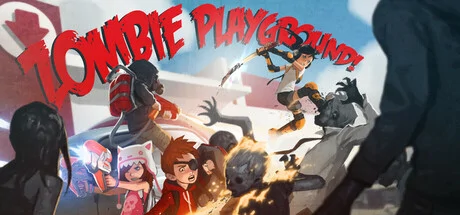
Zombie Playground™ is Goonies meets Attack the Block meets The Walking Dead. The mood we want to capture in Zombie Playground is the feeling that you had as a child when you were completely immersed in your imagination fighting monsters and doing things you thought were cool from your favorite movies, comics, and video games.
Stealth Studios Inc. has worked long and hard to create a game that delivers on the promise of our original vision. Zombie Playground™ is made with the brains, disease, and puke of all involved - that means heart! We've put everything we have into this development, and we intend to put a lot more.
Gameplay in Zombie Playground is a hybrid of third person shooter and action RPG mechanics set in a cooperative zombie survival horror arena. This translates simply to "A fun romp solo or with friends."
Key Features - What Me Worry??
Arena Style Map: Classroom Building Arena Map comprised of a Courtyard, a Main Entrance, and areas for Language Arts, Biology, Computer Science, and Music.
Multiple Enemy Types + BOSS FIGHT! Normal, +Elite, and even a Big Bad Boss! From crouched zombies, to vicious adult zombies, to the dreaded mopper of the halls... Buckethead, the Janitor! Can you topple this giant flesh bag and live to tell the tale? (If not, try with some friends!)
2 Playable Classes: 'Bully' is your damage dealing, tanky type class, where 'Rascal' is akin to an agility, or glass cannon, class. Both have their own stats and abilities: Bully-Bomb, Bully-Buff, Rascal-Can't Touch This, and Rascal-Speed Demon.
2 Playable Weapon Styles: Each class has both full melee and ranged combat capabilities, complete with combos and finishers. Why sacrifice one for the other when you can have both!?
17 Unique Weapon Choices (currently) to choose from: a variety of melee and ranged weapons. (And more in the pipeline!)
10 Missions: Do you have what it takes to discover the source of the contagion?
Tons of Gear!: We have over 200 different aesthetic assets in the game at present, and more are coming!
Up to 4 Player CO-OP Networking is a go! But sometimes, this function is more than 'one click' away. Should you encounter any issues, please check our forums on our main site.
Original Soundtrack by the Amazing Shawn Lee made specifically for Zombie Playground. Hot!! We were lucky enough to collaborate with Shawn in order to bring some sweet funky beats, crossed with an 80's style retro feel, to Zombie Playground. Some of Shawn's other credits include Bully, Tales from the Borderlands, and Sleeping Dogs.
Keyboard (or Controller) Breakdown: Be sure to check out the keyboard commands refresher, it will help you understand how to play the game better, complete with detailed descriptions of combos, finishers, and abilities. You can find it on our home page forums.
Stealth Studios Inc. has worked long and hard to create a game that delivers on the promise of our original vision. Zombie Playground™ is made with the brains, disease, and puke of all involved - that means heart! We've put everything we have into this development, and we intend to put a lot more.
Gameplay in Zombie Playground is a hybrid of third person shooter and action RPG mechanics set in a cooperative zombie survival horror arena. This translates simply to "A fun romp solo or with friends."
Key Features - What Me Worry??
Arena Style Map: Classroom Building Arena Map comprised of a Courtyard, a Main Entrance, and areas for Language Arts, Biology, Computer Science, and Music.
Multiple Enemy Types + BOSS FIGHT! Normal, +Elite, and even a Big Bad Boss! From crouched zombies, to vicious adult zombies, to the dreaded mopper of the halls... Buckethead, the Janitor! Can you topple this giant flesh bag and live to tell the tale? (If not, try with some friends!)
2 Playable Classes: 'Bully' is your damage dealing, tanky type class, where 'Rascal' is akin to an agility, or glass cannon, class. Both have their own stats and abilities: Bully-Bomb, Bully-Buff, Rascal-Can't Touch This, and Rascal-Speed Demon.
2 Playable Weapon Styles: Each class has both full melee and ranged combat capabilities, complete with combos and finishers. Why sacrifice one for the other when you can have both!?
17 Unique Weapon Choices (currently) to choose from: a variety of melee and ranged weapons. (And more in the pipeline!)
10 Missions: Do you have what it takes to discover the source of the contagion?
Tons of Gear!: We have over 200 different aesthetic assets in the game at present, and more are coming!
Up to 4 Player CO-OP Networking is a go! But sometimes, this function is more than 'one click' away. Should you encounter any issues, please check our forums on our main site.
Original Soundtrack by the Amazing Shawn Lee made specifically for Zombie Playground. Hot!! We were lucky enough to collaborate with Shawn in order to bring some sweet funky beats, crossed with an 80's style retro feel, to Zombie Playground. Some of Shawn's other credits include Bully, Tales from the Borderlands, and Sleeping Dogs.
Keyboard (or Controller) Breakdown: Be sure to check out the keyboard commands refresher, it will help you understand how to play the game better, complete with detailed descriptions of combos, finishers, and abilities. You can find it on our home page forums.
Score N/A
Released 10/31/2016
Developer
Publisher
Zombie Playground System Requirements
Minimum
- OS:
- -
- CPU:
- Not specified
- GPU:
- Not specified
- RAM:
- Not specified
- File Size:
- -
Recommended
- OS:
- -
- CPU:
- Not specified
- GPU:
- Not specified
- RAM:
- Not specified
Can I run Zombie Playground on my PC?
To run Zombie Playground on PC you need at minimum a Not specified processor, a Not specified graphics card, and Not specified of RAM running on Windows 10. For the best experience at recommended settings, upgrade to a Not specified CPU and Not specified GPU.
What GPU do I need to run Zombie Playground?
The minimum GPU required to run Zombie Playground is the Not specified. For smooth gameplay at high graphics settings, a Not specified is recommended.
How much RAM does Zombie Playground require?
Zombie Playground requires a minimum of Not specified RAM. For the recommended experience, Not specified of RAM is suggested.
How to check if your PC can run Zombie Playground
- Check your CPU: Compare your processor against the minimum requirement: Not specified.
- Check your GPU: Your graphics card should meet or exceed: Not specified.
- Check your RAM: You need at least Not specified of RAM installed.
- Check storage: Ensure you have at least Not specified of free disk space.
- Use our tool above: Select your RAM in the "Can I Run It?" box to get an instant result.